
Object Solutions : Managing the Object-Oriented Project
在 Object-Orientation Paradigm 中, 由於 OO 的特性有別於 Conventioanl Paradigms, 因此 Authors 為採用 Object-Orientation Paradigm 的 Project Team 以及 Developers 提出了兩種 Processes. 分為 Macro Process 以及 Micro Process, 分別適用於較大型的軟體長期開發, 以及少數 Developers 甚至單一 Developer 的短期開發. 同時解決, 在 Software Development Project 過程中, 無可避免的, 兩種 Processes 必然共同存在並 競爭 的問題.
由於本書特別分為兩種 Processes 提出, 適用於不同的情況, 且在同一個 Project 內往往需要這兩者的互相存在配合, 達到 Balance.
- Macro Process : 分為 Conceptualization, Analysis, Design, Evolution, Maintenance, 以 Waterfal 為基礎而建立, 適用於較中大型的 Projects, 較 High-Level 的 Control
- Micro Process : 分為 Identify Class and Objects, Identify Class and Object Semantics, Identify Class and Object Relationships, Specify Class and Object Interfaces and Implementation, 並且持續循環.
- Purpose
- Product
- Activity
- Agent : Agent 的用詞比較不常見, 同常會用 Developers, 但是在此書中, 在此探討 Project Staffing 的議題, 的確用 Agent 的詞會比 Developers 的用詞較為廣而貼切
- Milestones and Measures
References
[1] Grady Booch, Object Solutions : Managing the Object-Oriented Project, Addison Wesley, 1996
Python : os.chmod 的 mode 之 const variable 意義
今天在改 Project 內一部分程式碼的 Bug, 看到 Team Member 用了 os.chmod 來改系統檔案的權限. 之前沒用過, 因此 mode 的部份怎樣調整就查了一下 API Document. 沒想到 Document 裡也只有 mode 的選項列表, 沒解說 = =
查了一下才發現解讀法, 整理如下 :
S_IRGRP S_IROTH S_IRUSR
S_IWGRP S_IWOTH S_IWUSR
S_IXGRP S_IXOTH S_IXUSR
S_IEXEC = S_IXUSR
S_IWRITE = S_IWUSR
S_IREAD = S_IRUSR
S_IRWXG = S_IRGRP | S_IWGRP | S_IXGRP
S_IRWXO = S_IROTH | S_IWOTH | S_IXOTH
S_IRWXU = S_IRUSR | S_IWUSR | S_IXUSR
解讀方式如同上述的顏色標示, R = read, W = write, X = execution ; 而 GRP = group, OTH = other, USR = user, 對照到 Unix 系統的權限設定其實就很清楚了. 而後面的更為複雜的標示, 就是前面基本標示的混合而已.
AntiPatterns, 1
前幾天在看 AntiPatterns [1] 時發現一個有趣的地方, 在書一開始, 作者就先來了個 AntiHype Pattern, 直指過往的 Software Technologies 每一個新的世代都描繪了相當的理想, 但是最終卻都沒有夠達到當初的承諾.
書中總共列出了七個主要的趨勢 ( Trends ), 以及他們應該要能夠做到的事, 分別是 Structured Programming, Artificial Intelligence, Networking, Open Systems, Parallel Processing, Object Orientation, 以及 Frameworks.
而下一頁則是畫了一張圖來表達 AntiHype ( 引用自 [1] )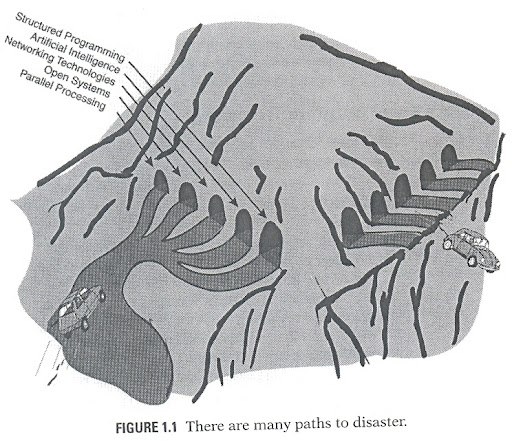
但有趣的是, 上面明明提到了七個趨勢, 但圖上卻只有畫出前五個 Paths. 是單純的因為圖畫不下七個 Paths, 還是說在當時的時空環境下, 作者其實也無法對 Object Orientation 以及 Frameworks 做出判斷呢 ? 如果是後者, 那麼真好奇將近十年後的現在, 作者是否會想改這張圖呢 ?
References
[1] William J. Brown, Raphael C. Malveau and Thomas J. Mowbray, AntiPatterns: Refactoring Software, Architectures, and Projects in Crisis, Wiley, 1998
在 Mandriva 2008 中安裝編譯 Conky 1.5
Conky 1.5 在 Mandriva 2008 沒有辦法直接從 Package Manager 安裝, 而手動安裝進行 ./configuration 之後, 接著進行 make 時會出現以下的錯誤訊息 :
這是由於 ifmap, ifreq, 以及 ifconf 分別在 /usr/include/net/if.h 以及 /usr/include/linux/if.h 中被重複定義了的緣故.
由於 Conky 在 make 過程中還是會需要 /usr/include/net/if.h , 因此也不能直接暫時把他移除掉. 取而代之, 先把 /usr/include/net/if.h 備份之後, 編輯 /usr/include/net/if.h , 然後把 ifmap, ifreq, 以及 ifconf 都暫時註解掉.
這裡要注意的是, 如果仔細比對 /usr/include/net/if.h 以及 /usr/include/linux/if.h 兩個檔案, 會發現 ifmap 是相同的, 但是 ifreq , ifconf 有許出入.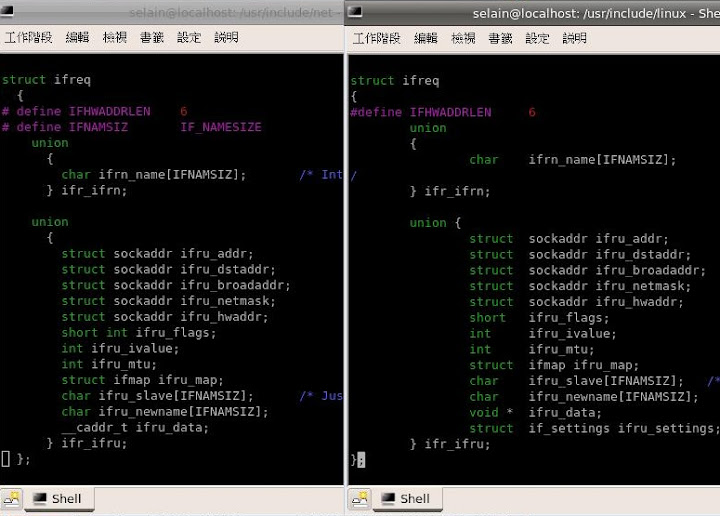
不過我很勇敢地還是把 /usr/include/net/if.h 的部份註解掉了. 於是就能夠順利作 make, 同時 make install 後, 就能夠直接在 command line 執行 cronky 了.
最後記得要把 /usr/include/net/if.h 給恢復原狀 :)