
Borland's New Tools : TeamDemand, TeamFocus, and TeamAnalytics, to Make SDP More Transparent
Borland 今天正式公佈了三個預計於秋季釋出( release ? 販售吧 :p )的新工具. 詳細情況可以參考 Computer World 的這篇新聞 : Borland adds tools aimed at making application development more transparent.
三個 Tools 分別為 :
- TeamDemand : 這個是三個 Tools 裡我覺得最沒想到的. 企圖把 User Requirements 連結到 Development Tasks 以及 Development Process, 想要提供 Business Users ( Customers ) 一個可以即時 ( Real-time ) 獲知目前進度的溝通管道. 我認為這要做得到其實不難, 但要做的好不容易. 簡單的來說, 能夠讓 User 根據 Requirement 隨時輸入 Test Cases 其實就成功一半了, 接下來只要自動找到相對的進度作 Testing 就是另一半, 不過這之間都還隱藏許多問題.
- TeamFocus : 看來應該是用來連結 Developers 使用的 Tools, 彙整相關的 Information, 產生開發過程中的相關 Reports. 預計可以大幅降低 Developers 需要花時間在整理 Intermediate Report 的時間.
- TeamAnalytics : 根據 Project 內部可以獲得的各種 Information, 結合在特定 Domain 下適用的不同 Metrics 組合, 量測出 Project 目前的狀態, 對於不佳的情況可以事先給予 Warning. 尚不知內部怎樣管理 Metrics,不過如果是用類似 GQM 方法的話, 應該可以想像 Goal 沒有達到預期就是一種 Warning 了.
Borland 真是 IDE 界的巨人阿~~
When to Reject the Customers/Users from Participating Your SDP ?
在 Software Development Project ( SDP ) 中, 理論上在哪個時間點之後, 絕對不能再有 Users ( Customers ) 的參與 ? 這是約莫一年半以前, 我的 Advisor 問所有 Lab. 同仁的問題, 但是直到現在, 我也依舊沒有肯定的答案 ^^b
先來看看手邊幾本的說法. 當然, 這是依我的解讀做的時間點判斷及說明, 同時內容以及最後我自己的想法都侷限在 Conventional Object-Orientation Paradigm. 同時只考量 General Customer, General Software ( to-be-built ), 以及 No Changing Requirements ( during development process ).
[1] Dean Leffingwell and Don Widrig, Managing Software Requirements: A Use Case Approach, second edition, Addison Wesley, 2003
我的理解 :
- 書中分為六個階段的 Team Skill, 我認為在 Team Skill 2 結束時也同時代表 customer 的參與告一段落.
- 在 software GUI 部份, 書中傾向於使用 Use Case 以及 Storyboarding 解決. 鑒於內容是以 Storyboarding 方式, graphically 呈現 Use Case, 因此我還是認定為 Storyboarding 的應用, 屬於 Team Skill 2 的範圍內.
- After Requirement Elicitation, Feature Listing, Interviewing, Brainstorming, and Storyboarding
- Before Use Case Diagram
我的理解 :
- 書中於 Requirement Phase 到 Object-Oriented Analysis Phase 之間, 特別分出了一個 Specification Phase. 在 Specification Phase 中提到 :
...this document must be clear and intelligible to the client, who probably is not a computer specialist. After all, the client is paying for the product, and unless the client believes that he or she really understands what the new product will be like...
- 因此我認為以書中的觀點, customer 至少會參與到 specification 的制定.
- 書中所指的 Specification Phase 事實上等同於一般說的 Analysis Phase[2], 而 Object-Oriented Analysis Phase 是作為 counterpart 存在.
- 同時書中也提到, 在 specification 訂立之後才能進行較準確的 project time and cost estimation, 而 customer 會根據評估結果決定是否繼續委託開發. 從 project 角度來說, customer 在此時仍影響 project 的進行, 但是從 software development 的角度來說, 並未影響 software development 的各種 decisions.
- End of Specification Phase
- Right after Project Time and Cost Estimation and Evaluation
我的理解 :
- 書中把 Requirement 分為 C-Requirement ( Customer Requirement ), 以及 D-Requirement ( Detailed Requirement ) 兩部份. 其中 C-Requirement 包含了 Use Case 的建立與撰寫, 以及 Draft User Interface Design. 此階段仍有 customer 參與.
- D-Requirement 的撰寫雖然主要是提供 software developers 一個之後進行 design 以及 implementation 的共同基礎,但是書中也提到 D-Requirement 需要 customer 參與 validation 的工作. 但是由於書中對於 D-Requirement 的內容敘述, 甚至包含了 Classes / Objects 的辨認, 因此 customer 協助確認的應該不是全部的 D-Requirement 內容.
- Right after D-Requirement ( Detailed Requirement ) is released
- Very close to the end of Object-Oriented Analysis Phase
我的理解 :
- 書中提到 :
A review of the Software Requirement Specification ( and / or prototype ) is conducted by both the software developer and customer.
- 而依據書中所述, Software Requirement Specification 是 Requirement Analysis 的產物, 因此在此 customer 的參與應該是到 Requirement Analysis 結束之後, 或是 Software Requirement Specification 的 review
- End of Requirement Analysis
- Review of Software Requirement Specification
[5] 我的想法
由於我對於 OO Paradigm 底下的 Software Development, 主要的認識來自於 [1][2][3] , 因此以這些書中所提的觀點以及方法 ( Techniques ) 來回答此時間點。
我所 prefer 的時間點為, Use Case Diagram 的建立。
但此時間點僅包含 Use Case Diagram 的建立, 不包含 Use Case 的 Pre-Condition, Post-Condition, 以及中間的 Event Flow, Alternative Flow 的撰寫。
我所持的理由為, Use Cases 能夠將 Scenarios 化為數個合理大小的 User Action Sets。 雖然 Use Cases 本身仍然用 nature language 描述居多, 但是比起一般的 Scenarios 描述, Use Cases 提供一個更適切的 granularity, 讓 customer 認識自己與 software 之間的互動。 而適切的 granularity 也是此時間點僅止於 Use Case Diagram 的理由。 我認為 Use Case 的內容又過於仔細, 對於一般的 Customer 來說反而可能造成困擾, 如果要求 Customer 參與 Use Case 內容的撰寫, 對 Developer 來說也會是一種困擾。
但是在 Customer 參與 Use Case Diagram 的制定時, 所提出的一些意外的要求或是 Concerns, 有可能會影響到 Developer 對於 Use Cases 內容的撰寫。
另外我認為要特別考量的一個問題是 Software GUI。 鑒於我所知道的, 在 OO Software Development, 並沒有公認的時間點來決定 customer 所 prefer 的 GUI 樣式, 但是 software GUI 又是影響 software usability 甚鉅的部份, 因此大部份情況下, 與 customer 針對 GUI 作溝通是免不了的。 因此在 software 有 GUI 的設計考量下, customer 能參與的 software development 的時間點我認為就會受到 software GUI 要在何時與 customer 取得共識的影響。 不過此時間點僅與 GUI 設計有關, 與其他部份無關。
CMMI MindMap : Staged & Continuous Views
可以把 Staged View 看成是 Level by Level, 每個 Level 含有多個 Process Area, 包含在四個大類別 ( Process Management, Project Management, Engineering, Support ) 中.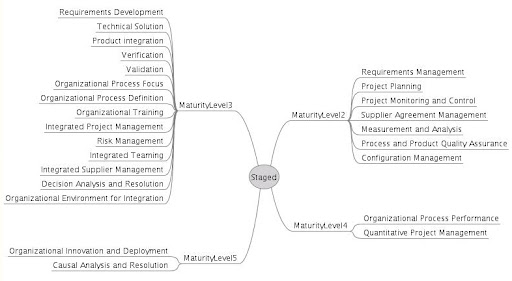
同時在各個 Level 之間, 也可以四個類別為導向, 垂直地 ( Vertically ) 串起 Process Area, 也就是 Continuous View.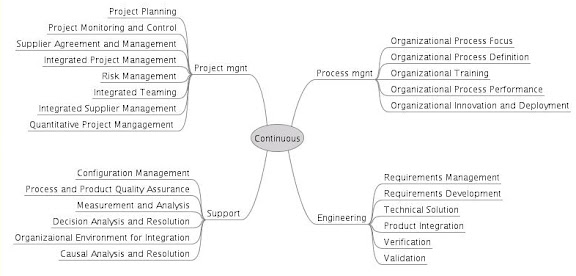
Object Solutions : Managing the Object-Oriented Project
在 Object-Orientation Paradigm 中, 由於 OO 的特性有別於 Conventioanl Paradigms, 因此 Authors 為採用 Object-Orientation Paradigm 的 Project Team 以及 Developers 提出了兩種 Processes. 分為 Macro Process 以及 Micro Process, 分別適用於較大型的軟體長期開發, 以及少數 Developers 甚至單一 Developer 的短期開發. 同時解決, 在 Software Development Project 過程中, 無可避免的, 兩種 Processes 必然共同存在並 競爭 的問題.
由於本書特別分為兩種 Processes 提出, 適用於不同的情況, 且在同一個 Project 內往往需要這兩者的互相存在配合, 達到 Balance.
- Macro Process : 分為 Conceptualization, Analysis, Design, Evolution, Maintenance, 以 Waterfal 為基礎而建立, 適用於較中大型的 Projects, 較 High-Level 的 Control
- Micro Process : 分為 Identify Class and Objects, Identify Class and Object Semantics, Identify Class and Object Relationships, Specify Class and Object Interfaces and Implementation, 並且持續循環.
- Purpose
- Product
- Activity
- Agent : Agent 的用詞比較不常見, 同常會用 Developers, 但是在此書中, 在此探討 Project Staffing 的議題, 的確用 Agent 的詞會比 Developers 的用詞較為廣而貼切
- Milestones and Measures
References
[1] Grady Booch, Object Solutions : Managing the Object-Oriented Project, Addison Wesley, 1996
UMLSpeed : a C-style light weight UML edition, layout tool
UMLSpeed 是一個 light weight 的 UML edition 以及 layout tool, 以 text-based 方式撰寫 UML-based design, 同時 UMLSpeed 則幫忙產生 SVG UML graphical layout, 以及支援轉換成 XMI 輸出, 或是其他 programming language 的 code generation.
UMLSpeed 作者之所以開發的理由包含 : (引用修改自 UMLSpeed 網頁)
- Graphical UML tools in general suck - why should we, as programmers have to drag and drop stupid graphical things and use a mouse when we could express what we want 10 times faster with a text editor and a simple notation?
- A declarative approach is closer to the mental model used by developers when designing systems.
- Why should we layout diagram components when the computer could do it for us?
- Graphical UML tools are bloated, huge, memory and disk-hogging monsters.
- Graphical UML tools use either a binary data format or XML, which is not particularly friendly to source code control systems.
以第 3 點來說, 雖然說 layout 不可能完全由 computer 取代, 身為吹毛求疵的 designer, 就算 tool 能夠自動幫我做 layout, 八成還是會對結果動手動腳的. 但是基本上 layout 結果的好壞是可以用一些 graph complexity metrics 去評量好壞的, 因此自動產生的結果是可以趨近 designer 會感到滿意的結果, 因而還是可以省下不少功夫, 更別說可以根據 designer 的喜好產生專用的 layout style. 第 4 點的問題應該常用許多 IDE 的 designer 都有相同的感覺吧, 有時候想要功能比較強, visualization 比較好看的 IDE, 卻會有需要大量 resource 的問題. 而 light weight 的 tool 往往功能上就比較被侷限住. 不過這基本上是個很難兩全其美的問題. 唯一的 solution 可能是能夠有一個 easy-customizable 的 IDE, 使得在不同的 environment 下可以很容易作 customization, 得到最需要的功能就好. (不過至今沒有這樣的 IDE 出現, 連 Eclipse 也還做不到)
同樣地對於第 1 點來說, grphical editor 在 visualization 上有他的優勢在, 我相信 graphical software design 只是還沒有突破性的發展, 但是 visualization 在 software design 上至少可以同時結合 design layout 與 design document (design code) 之間的 traceability, 但是像 UMLSpeed 這樣的 tool 就沒有支援這樣的 traceability, 只是因為 UMLSpeed 功能不強大, 所以這樣的缺點也就沒有被放大. 第 5 點也是見仁見智的問題, 採用 XML-based solution 是為了標準化以及延伸性考量, 如果不考慮此點當然可以批評採用 XML 的做法. 但是相對來說, 採用自家標準的 tools 往往容易被淘汰, 至少我就不太會想用, 因為 data 無法被不同的 tools 共用, 換句話說無法被長久保存, 這是很困擾的事情. 要是 UMLSpeed 沒有支援 SVG 或是 XMI 輸出, 我大概也不會想用了.
UMLSpeed 的使用是以 C-style 的 text-based code "programming" 展開, 看圖就很清楚了, (下圖取用自 UMLSpeed 網站 )
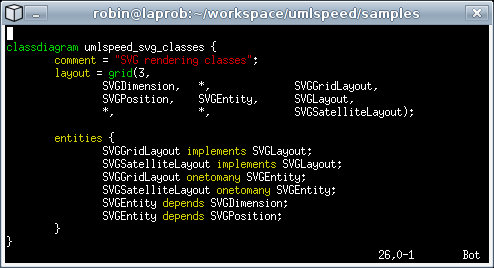
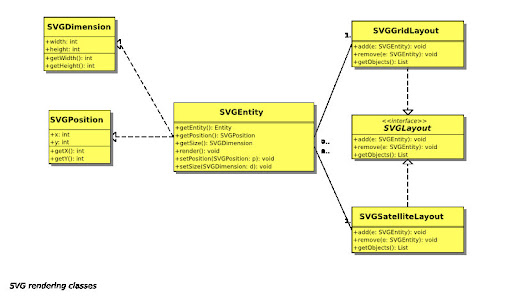 而輸出是以 SVG 格式的檔案輸出, 另外支援 XMI UML 文件輸出. 另外從網站上看來, UMLSpeed 目前支援 use case diagram, class diagram, sequential diagram, 以及 deployment diagram.
基於 UMLSpeed 的特性, 我認為有幾個不錯的額外用途 :
- Software project 階段性的 design review, code review : 在 software project 進行過程中, 偶爾會需要進行 design review 或是 code review. 這通常是由於 design 或是 source code 已經有點混亂, 因此該部分的 leader 會召開會議, 把所有負責各部分的 designer / programmer 集合起來, 針對整個 design / source code 作 review, 確認每個部分的用途, 以及解決方法是否足夠好. 由於會議人數眾多, 同時進行會議中可無法容忍慢吞吞的大型 IDE, 或是時不時出現的 IDE 怪問題. 因此像是 UMLSpeed 這樣能夠快速進行 pure text-based modification 以及自動 layout 的 tool 應該適合使用. 但是要達成此點, UMLSpeed 跟其他 project 會用到的主流 IDE 之間的 data consistency 問題可能需要被解決.
- Design on mobile devices : 可能會想要這樣功能的人很少, 但是我就是其中之一 :p . 在 mobile devices 上, 或是如最近的 ASUS EeePC 上要跑平常的 IDE 幾乎是不可能的(很辛苦), 但是畢竟我想要的只是在等人或是喝個咖啡時, 可以思索一下最近手上計畫的 software architecture 的一小部分 design 而已, 一個 light weight, 可以馬上產生圖的 tool 就足夠使用了. 這些需求 UMLSpeed 看起來通通符合 :)
- UML programming on Wiki, Blog System : 我們實驗室使用的是 MoinMoin Wiki System, 偶爾會想在 Wiki 上畫個 UML 圖形來說明. 在 MoinMoin 上已經有類似的 plug-ins, 使用上跟 UMLSpeed 有點像, 只需要撰寫特定格式的 UML code, 就可以在頁面上被轉換成為 UML graph. UMLSpeed 應該可以提供在 Wiki 或是 Blog System 上的類似支援
Assessing Open Source : Ohloh.net
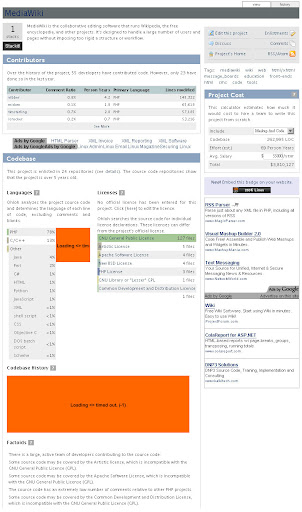
我大約在一年前第一次到 Ohloh.net 一逛, 那時整個網站公開還不久, 大約幾個月而已. 一切都還很陽春, 只有大約 3000 多個 projects (其中有些是空號, 因為我那時閒閒沒事寫個 crawler 把人家資料整個抓下來分析 XD), 其中有很多還是空號. 那時的 project assessment 頁面長的像這樣 (幸好有舊資料留著), 以下是舊畫面歐 :
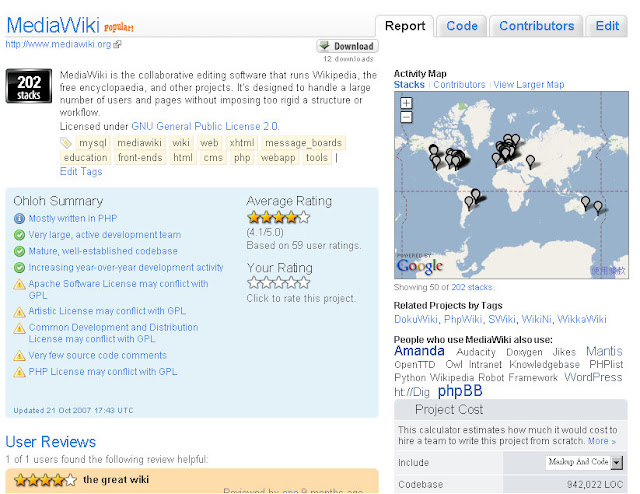
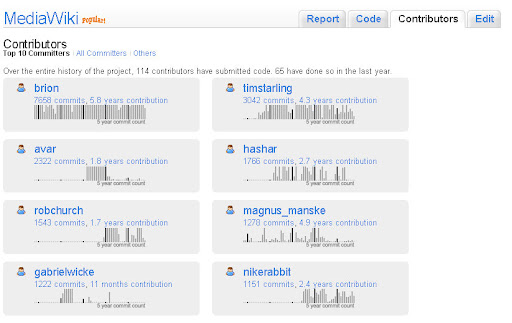
而資料方面只有針對 project 的 contributors 以及 code base 作分析. code base 只有 language 比例分析, license 分析, 以及 code base 大小增長曲線分析. 其中比較有趣的是右方的 project cost estimation, 用來推測此 OSS project 在業界的 cost 會是多少. 當初已經有 community 功能, 但是參與的人還很少. 現在已不可同日而語了, 除了 project 本身的 statistics 統計有更好的分類以及更詳細的內容, 結合 project 相關 news 也使得我們一次可以接收到該 project 進行的最重要發展訊息, 以及 community 內的相關 comments.
一樣是 MediaWiki, 現在比較漂亮, 資訊也比較多了.
當初會找到 Ohlon.net 的原因之一是因為, 當時我正在參與實驗室的一個 OSS software measurement 相關計畫, 也作了一個簡單的 tool 分析 SourceForge.net 上的 OSS software 其 source code 相關資訊, 包含 programming language 組成, package 組成, quality evaluation 等等. 當時就想到, 雖然 software measurement 的 tools 已經有很多, 但是似乎沒有看到過有作成網站提供服務給 software project 的. 加上當時已經是 open source portal 龍頭的 S.F.net 也沒有類似的功能 ( 直到現在 S.F.net 還是只有基本的 project statistics 統計功能 ), 就想說把做好的 tool 延伸作成 web application, 然後作成一個提供此種服務的網站應該會是很有趣的事情, 比起 OpenFoundry 要學 S.F.net 又學的不好來的有市場機會多了.
沒想到 domain analysis 作著作著就發現 Ohloh.net 早已經開始作一樣的事情了.
Ohloh.net 創始者只有兩個人, Jason Allen 以及 Scott Collison, 有趣的是兩個人都是從 Microsfot 出身的. 在離開 Microsoft 之後, 有感於當時的 Open Source community 缺少統一的 software evaluation 服務, 無法讓其他開發者或是使用者對於有興趣的 OSS project 在 management 以及 quality 上有更深入的了解, 因此創立了 Ohloh.net, 希望不只幫助有興趣的人了解, 也讓 OSS project manager 可以從 engineering 觀點提升自己的 project efficiency 以及 product quality.
一年來 Ohloh.net 穩健地成長, 不僅網站提供的 evaluation angles 越來越多, community 也有逐漸茁壯的感覺. 但我覺得在 Ohloh.net 提供的 services 到 project manager 如何利用這些 services 以改善 projects 還有一些 gap 存在. 或許 Ohloh.net 應該針對他們的服務是否有達到預期的效果作 validity 檢測, 或是以問卷詢問 services 使用者的 satisfaction, 作為未來要增加的新服務之基礎.
Anyway, 這是一個值得時常造訪, 長期觀察的網站 :)
Goal-Question-Metric (GQM) and Software Measurement : A Personal Understanding
V. R. Basili 在 1984 開始逐步提出 Goal-Question-Metrics 方法 [1] (後有人稱整個相關概念成為一個 paradigm), 而常見的引用以及較為完整的說明可以在 [2] 找到. 關於 GQM 的內涵, 目的以及用處在 [2] 中已有說明, 在此不贅述.
單看字面以及 [2] 的說明, 容易陷入錯誤的迷思, 認為 GQM 的流程在於推導出適合使用的 software metrics 而已. 這顯然是錯誤的認知. 在 Wikipedia 上對於 GQM 列出六個 steps [3], 而關於 software metrics 的推導僅佔了前三個 steps. 以下六個 steps 引用自 Wikipedia:GQM,
- Develop a set of corporate, division and project business goals and associated measurement goals for productivity and quality
- Generate questions (based on models) that define those goals as completely as possible in a quantifiable way
- Specify the measures needed to be collected to answer those questions and track process and product conformance to the goals
- Develop mechanisms for data collection
- Collect, validate and analyze the data in real time to provide feedback to projects for corrective action
- Analyze the data in a postmortem fashion to assess conformance to the goals and to make recommendations for future improvements

我認為 GQM process 應該可以被清楚地分為兩個 phases. 在 Definition Phase 目的是推導或是組合適當的 metrics. 而在 Utilization Phase 則是利用推導的過程得到的產品, 包含 metrics, question 與 metrics 之間的 associations, goal 與 questions 之間的 associations, 自 bottom-up 去檢驗是否 goal 有被滿足, 從而出發 refinement actions. 而在這之中, 實際對於 data 進行 measurement 就發生在 utilization phase 的第一步. 同時這張圖也說明了 GQM 與 software measurement 之間的關聯.
在 GQM 身上事實上還留有許多相當模糊的空間. V. R. Basili 在 [2] 中事實上也是透過 examples 來說明 GQM 的使用而已. 然而這就留下許多問號, 例如究竟我應該選擇哪些 objects 設立 goals ? 怎樣的敘述較像是一個 goal ? 怎樣自 goal 推導出 questions ? 怎樣的敘述比較像是一個 question ? 怎樣為 question 定出合理的 metrics ? 這之中最大的問題可能還是在於 questions 身上, 也就是 operational level 的決定. 在我看過的書以及 papers 中, 對於怎樣使用 GQM 似乎還沒有一個比較明確的 rules 出現. 先階段似乎只能夠根據一些 examples, 或是看看別人的 papers 怎樣利用 GQM 進行說明, 來仿效使用.
References
[1] V. Basili, Barry T. Perricone, "Software Errors and Complexity: An Empirical Investigation," Communications of the ACM, vol.27, no. 1, pp.42-52, January 1984
[2] V. Basili, G. Caldiera, and H.D. Rombach, The Goal Question Metric Approach, Encyclopedia of Software Engineering, pp. 528-532, John Wiley & Sons, 1994.
[3] Wikipedia:GQM, URL : http://en.wikipedia.org/wiki/GQM
CVSGrab
看名字就知道 CVSGrab 是用來抓取 CVS 資料用的. 不過 CVSGrab 並非一般利用 pserver 與 CVS server 作 communication 的 CVS client, 而是透過 CVS web interface, 去讀取 CSV server 內的資料.
之所以這樣做是因為, 往往要 access 某個 project 的 CVS server 時, 卻發現被網路上的某個 firewall 擋住了 pserver, 不見得是刻意檔的, 可能是公司只有開放 http port 之類的, 因此就無法利用走 pserver protocol 的 CVS client 去讀取 CVS 資料. 而 CVSGrab 利用 http, 透過各種 CVS web interface (例如 ViewCVS or CVSWeb, ViewCVS 現在叫 ViewVC 了, 因為也支援 SVN 了 ) 去抓取 CSV 上的資料, 來解決這樣的問題.
不過這樣的話, 我倒覺得名字應該叫做 WebCVSGrab 或是 CVSWebGrab 比較適切 :p